


Table of Contents
- Introduction of Post Processing in ANSYS APDL
- Why Post Processing is Important in ANSYS
- Listing Results
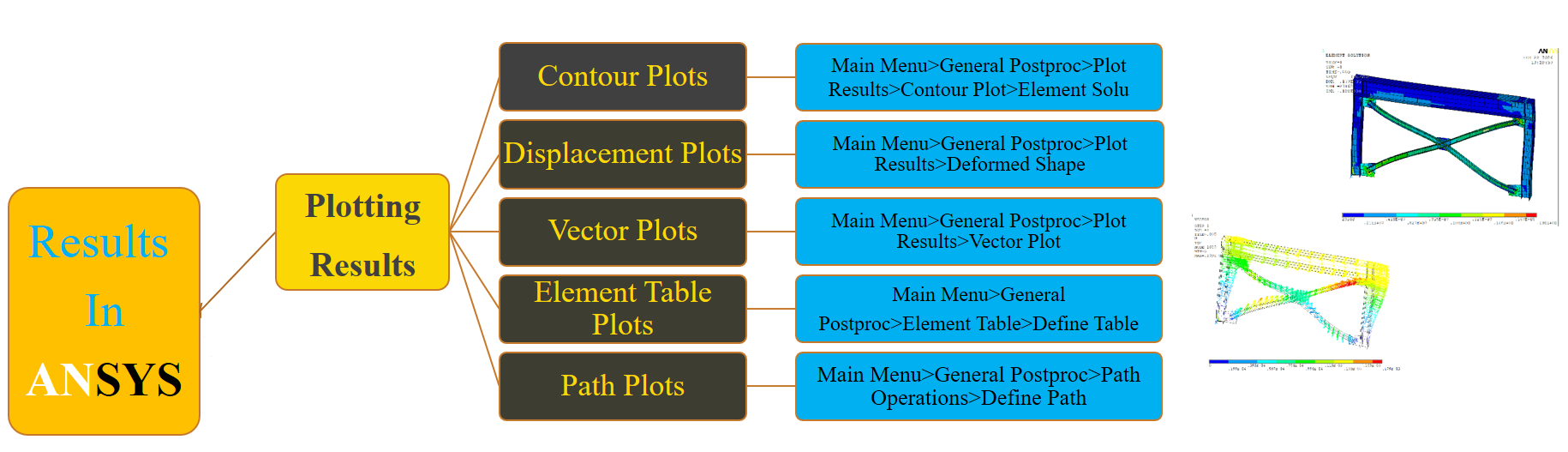
- Plotting Results
- Contour Plots
- Deformed Shape
- Vector Plots
- Element Table Results
- Path Operations
- Animating Results
- Graphing Results (POST26)
- Model Verification
- Model Validation
- Project Features
- Who Should Use This Project
- Why This Project is Valuable
- Download Project
Introduction
Post Processing is one of the most important stages of every finite element analysis in ANSYS APDL. Regardless of how accurate a model is created, the engineering value of the analysis depends entirely on how correctly the results are extracted, interpreted, verified, and validated. Post Processing in ANSYS APDL
Many engineers can build finite element models, but only experienced analysts know how to obtain meaningful engineering conclusions from ANSYS results.
This project teaches professional post-processing techniques used in real engineering projects.
Why Post Processing is Important in ANSYS
Finite Element Analysis produces a huge amount of numerical data.
Without proper post-processing it is impossible to determine:
- Structural behavior
- Maximum stress
- Maximum displacement
- Critical locations
- Plastic zones
- Failure regions
- Load transfer
- Deformation mechanism
- Energy distribution
- Reaction forces
Professional post-processing converts numerical outputs into engineering decisions.
Listing Results
One of the first methods for reviewing analysis outputs in ANSYS APDL is the Listing Results option.
This project explains how to extract numerical information directly from the solver database.
Topics include:
- Nodal Result
- Element Result
- Stress listing
- Strain listing
- Reaction forces
- Element solution
- Nodal solution

The tutorial also demonstrates how to export numerical results for reports and further calculations.
Plotting Results
Graphical visualization is one of the strongest capabilities of ANSYS APDL.
This project explains every important plotting tool used in engineering practice.
Topics include:
- Stress contours
- Strain contours
- Total deformation
- Principal stresses
- Von Mises stress
- Element results
- Nodal results
- Reaction forces
- Temperature distribution (when applicable)
Contour Plots
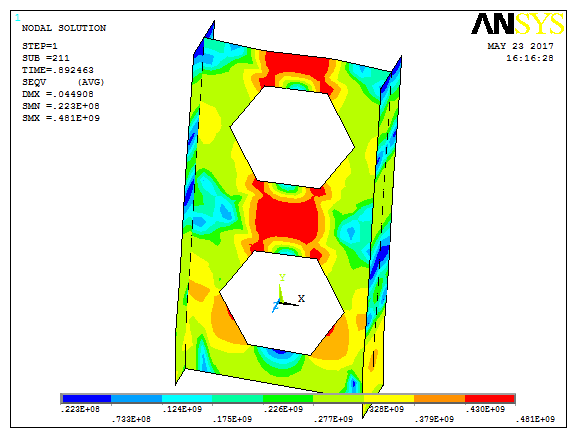
Contour plots provide a clear visualization of the distribution of engineering quantities throughout the model.
Post Processing in ANSYS APDL
The project explains how to display:
- Equivalent (Von Mises) Stress
- Principal Stress
- Principal Strain
- Shear Stress
- Contact Pressure
- Thermal Results
- User-defined quantities
Students also learn how to customize legends, color maps, averaging options, and plotting settings.
Deformed Shape
Understanding structural deformation is essential for evaluating the behavior of any engineering model.
Post Processing in ANSYS APDL
This section explains:
- True deformation
- Scaled deformation
- Undeformed shape
- Combined contour and deformation plots
- Large displacement visualization
Vector Plots
Vector plots help engineers understand the direction and magnitude of physical quantities.
The tutorial demonstrates:
- Displacement vectors
- Force vectors
- Reaction vectors
- Heat flow vectors
- Velocity vectors (for applicable analyses)
Element Table Results
Element Tables provide access to advanced element quantities that are not directly available through standard plots.
The project explains:
- Creating Element Tables
- Defining user variables
- Stress components
- Strain components
- Energy values
- Contact quantities
- Averaging options
This feature is widely used in professional engineering reports.
Path Operations
Many engineering analyses require extracting stresses or strains along a specific line.
This lesson teaches:
- Define Path
- Path Operations
- Stress along a line
- Displacement along a path
- Crack propagation investigation
- Stress concentration evaluation
Path operations are especially useful for bridges, tunnels, dams, retaining walls, pressure vessels, and mechanical components.
Animating Results
Animations help engineers better understand structural behavior.
The tutorial explains how to create professional animations of:
- Static deformation
- Dynamic response
- Harmonic vibration
- Modal shapes
- Time-history response
- Crack propagation visualization
- Contact behavior
Animations are also valuable for engineering presentations and client reports.

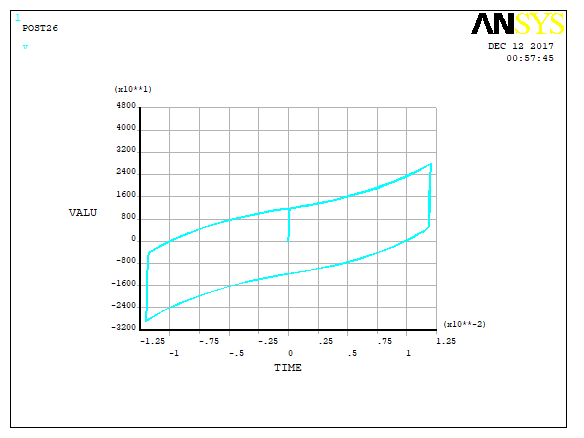
Graphing Results (POST26)
POST26 is one of the most powerful modules inside ANSYS APDL.

Instead of viewing only one load step, engineers can investigate how results change over time.
Topics include:
- Time-history plots
- Load-step history
- Displacement versus Time
- Force versus Time
- Stress versus Time
- Frequency response
- User-defined variables
These capabilities are essential for transient and dynamic analyses.
Model Verification
Verification answers one important question:
“Was the finite element model built correctly?”
This project explains practical verification procedures including:
- Boundary condition verification
- Material verification
- Mesh verification
- Load verification
- Element verification
- Equilibrium checks
- Reaction force checks
- Energy balance
Proper verification greatly reduces modeling errors.
Model Validation
Validation answers a different engineering question:
“Does the finite element model represent the real physical behavior?”
The tutorial explains professional validation methods including:
- Experimental comparison
- Laboratory testing
- Published research comparison
- Analytical solution comparison
- Error estimation
- Calibration techniques
- Material calibration
- Boundary condition calibration
Validation is one of the most important steps in professional finite element analysis.
Project Features
This complete ANSYS APDL project includes:
- Professional APDL source code
- Complete ANSYS project files
- Real engineering examples
- Step-by-step explanation
- High-quality video tutorial
- Numerical verification procedures
- Model validation workflow
- Engineering interpretation of results
Who Should Use This Project?
This project is ideal for:
- Civil Engineers
- Structural Engineers
- Mechanical Engineers
- Geotechnical Engineers
- Aerospace Engineers
- Researchers
- Graduate Students
- PhD Students
- Engineers using ANSYS APDL for real projects
Why This Project is Valuable
Learning post-processing correctly is often more important than building the finite element model itself.
This project teaches professional engineering workflows used in industry to:
- Interpret numerical results
- Detect modeling errors
- Verify finite element models
- Validate simulation accuracy
- Produce publication-quality engineering figures
- Prepare professional engineering reports
If you want to become an advanced ANSYS APDL user, mastering post-processing is an essential skill.
Download Project
Download this complete Post Processing in ANSYS APDL project and learn professional techniques for displaying, viewing, verifying, validating, and interpreting finite element analysis results used in real engineering applications.
YouTube Video
🎥 Watch the complete tutorial on YouTube to learn how to display, analyze, verify, validate, and export results in ANSYS APDL. This lesson covers every important post-processing technique used in structural finite element analysis, including contour plots, deformation plots, element tables, path plots, animations, graphing results, and model verification & validation.
Related Downloads
- Steel Material in ANSYS APDL
- Concrete Material in ANSYS APDL
- Composite (FRP) Material in ANSYS APDL
- Element Definition in ANSYS APDL